Tool Counter-Training
Most practitioners confuse fluency in a software interface with mastery of the underlying craft. They spend five years memorizing keyboard shortcuts, custom macros, and workspace layouts inside a single application. When their output speeds up, they call it growth.
It is not growth. It is accommodation.
Loyalty to a tool is not craftsmanship, not depth, and not “workflow optimization.” It is a comfort groove that hides where your actual capability stops and the software’s scaffolding begins.
When you use the same tool every day, you stop solving problems from first principles. You only see the problems your tool makes easy to express. You repeat the same architectural patterns, paint with the same visual crutches, and run the same mental loops until your progress flatlines.
To break a plateau, you do not need another plugin or a faster shortcut. You need constraint shock. Put down Photoshop for thirty days and force yourself to work exclusively inside Procreate. Close Cursor and run your next production sprint inside Antigravity.
Switching tools is counter-training for the brain. The friction is the point.
The Physiology of the Plateau: Why the Body Stops Adapting
Anyone who trains physically understands the law of accommodation.
Walk into a gym and run the exact same barbell bench press routine with the same grip, the same tempo, and the same load every Monday for a year. For the first six weeks, your central nervous system adapts rapidly. Motor units learn to fire in sync, stabilizer muscles coordinate, and strength climbs. By month four, the gains stop.
Your physiology is governed by energy conservation. Once a movement pattern becomes predictable, the nervous system grooves the motor pathway to execute that exact motion with minimum metabolic cost and zero new tissue recruitment. You are still moving weight, and you are still sweating, but you have stopped adapting. You are just repeating a rehearsed groove.
Worse, if you spend years training exclusively on fixed-path selectorized machines, your prime movers grow strong along a single guided rail while your stabilizer muscles atrophy. Take someone who only presses on a guided chest machine and put them under shaky gymnastics rings or heavy uneven kettlebells. Their form collapses immediately. The machine was supplying the stability they thought they owned.
Software tools work on the exact same physiological loop:
- Motor grooving becomes cognitive grooving: Your brain maps problem-solving directly to the menus, panels, and autocomplete patterns of your daily driver. You stop thinking about color value or system state and start thinking in layer styles and keybindings.
- Guided rails atrophy your stabilizers: Heavy, feature-rich environments absorb your mistakes silently. When the tool handles non-destructive recovery or line-by-line syntax prediction for you, your raw judgment atrophies.
- Novelty spikes threat baseline: Opening an unfamiliar interface strips away your muscle memory. Your speed drops by half in the first hour. That drop in fluency triggers mild threat avoidance in the nervous system, convincing you that the new tool is “inefficient” when it is actually exposing a weak stabilizer.
The body does not adapt to comfort. It adapts to unfamiliar mechanical tension.
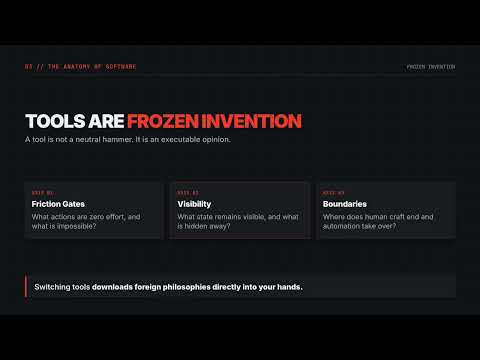
Tools Are Frozen Invention
Every piece of software is an executable opinion.
A tool is not a neutral hammer. It is the crystallized invention, scar tissue, and worldview of the engineers and designers who built it. When a team builds a creative canvas or a development environment, they encode specific answers to hard questions:
- What actions should require zero friction, and what actions should be impossible?
- What state should remain visible at all times, and what state should be abstracted away?
- Where does human judgment end and machine execution begin?
When you stay locked inside one tool for years, you are living inside one team’s mental model. When you step into a different tool, you download a foreign philosophy of the craft directly into your nervous system. You do not read a theory about how other builders think: you experience their invention through your hands.
Look at what happens when you deliberately swap two dominant daily drivers for their structural counterparts.
Visual Art & Design
- Familiar Daily Driver: Photoshop
- Counter-Training Environment: Procreate
- Encapsulated Invention & Constraint Shock: Replaces infinite non-destructive Smart Objects and Adjustment Layers with hardware-bound layer limits and direct Apple Pencil gesture mechanics
- Stabilizer Muscle Built: Decisive mark-making, committed color mixing, and compositional clarity without an infinite undo safety net
AI Software Engineering
- Familiar Daily Driver: Cursor
- Counter-Training Environment: Antigravity
- Encapsulated Invention & Constraint Shock: Shifts from synchronous Tab autocomplete and single-loop Agent mode to an asynchronous agentic harness with concurrent subagents across isolated workspaces
- Stabilizer Muscle Built: Upfront architectural specification, parallel task decomposition, and ruthless code review over manual typing
Leave Photoshop and Lock Yourself in Procreate
Adobe Photoshop is a monument to non-destructive safety. Its core architecture revolves around preserving every option forever: Adjustment Layers, Smart Objects, Smart Filters, clipping masks, and deep history states. You can build a 300-layer composition where every shadow, hue shift, and texture sits on its own isolated rail, waiting to be tweaked six weeks later.
That safety net is powerful for commercial production, and lethal for decisive artistic instinct.
When every stroke can be masked, filtered, or adjusted after the fact, you stop committing. You nudge sliders instead of reading light. You stack six blending modes to rescue a weak drawing instead of fixing the underlying form.
Now close Photoshop and limit yourself to Procreate on an iPad.
Procreate encapsulates a completely different invention: direct, physical mark-making under strict hardware boundaries. Two constraints hit you immediately:
- Hard layer ceilings force commitment: In Procreate, your maximum layer count is strictly capped by your iPad’s RAM and canvas dimensions. Work at high print resolution, and you might get twenty layers instead of two hundred. You cannot hoard separate layers for every eyelash and highlight. Like a traditional oil painter working wet-on-wet, you are forced to merge layers down, paint directly over your mistakes, and commit to your values early.
- Somatic gesture replaces menu diving: Procreate strips away the cockpit of docked desktop palettes in favor of touch gestures and Apple Pencil pressure and tilt control. Two-finger tap undoes; three-finger scrub clears; Apple Pencil hover and squeeze gestures adjust brush size, opacity, and layer selection without breaking eye contact with the canvas.
After two weeks in Procreate, you realize how much of your “process” in Photoshop was actually hesitation disguised as layer management. When you eventually return to a desktop compositor, you no longer hide behind fifty adjustment layers. Your line weight, value control, and compositional decisions land on the first pass.
Close Cursor and Build in Google Antigravity
The same trap is playing out right now in software engineering.
Many developers spent the past two years migrating into Cursor, mastering its high-speed synchronous loop: typing a function signature, letting Tab completion predict the next ten lines across files, firing quick inline edits, and supervising a single Agent mode thread while watching diffs stream into the editor.
Cursor is built around the invention of the augmented pilot. You remain in the cockpit seat, hands on the controls, moving through code at five times your old typing speed.
Because that loop feels fast, engineers plateau inside it. They stay tethered to the file tree, micro-managing one prompt at a time, acting as human routers for a single agent thread.
Now close Cursor and force yourself to ship a system in Google Antigravity.
Antigravity encapsulates a different architectural thesis: the agent-first development platform. Instead of treating AI primarily as an inline pair programmer inside your active cursor focus, Antigravity wraps the workspace in an agentic harness designed for multi-agent orchestration and asynchronous subagents.
Stepping from Cursor into Antigravity forces an immediate shift in how you engineer:
- From synchronous typing to asynchronous orchestration: When you can dispatch multiple custom subagents working concurrently across separate workspaces, sitting in an editor watching lines of code appear becomes the bottleneck. You are forced to decompose systems into independent, non-colliding work packages before execution starts.
- From reactive nudging to strict input/output contracts: An asynchronous agent running in the background cannot rely on you hitting
Tabor interrupting every thirty seconds when it drifts. If your specification is vague, the agent builds the wrong system. Antigravity punishes lazy prompting and forces you to write crystal-clear architectural boundaries, verification gates, and test harnesses up front. - From code writer to systems auditor: When agents handle planning, multi-file implementation, terminal execution, and browser verification autonomously, your value shifts entirely to system design and adversarial verification.
Spend a month orchestrating parallel agents in Antigravity, and you will see your own engineering bottlenecks clearly. Even when you go back to synchronous coding in Cursor or a raw terminal, you stop writing sprawling, tightly coupled code because your brain has been rewired to think in clean, delegable module boundaries.
Separating Skill From Scaffolding
How do you know if you actually own a skill, or if your tool owns it for you?
Run your workflow through a four-layer functional stack:
- Foundations (Transferable Laws): In visual art, this is proportion, perspective, value hierarchy, and color temperature. In software, this is state lifecycles, data structures, memory constraints, and failure isolation. Foundations survive every tool change.
- Leverage (Amplification Mechanics): How a specific tool multiplies your force. Photoshop gives you leverage through batch compositing and smart filters; Procreate gives you leverage through tactile speed; Cursor gives you leverage through predictive edit velocity; Antigravity gives you leverage through concurrent agent orchestration.
- Stability (Error Recovery): How you keep work from collapsing under load. If your stability comes entirely from Photoshop’s undo history or an IDE’s inline linter catching every typo, your stability is external. True stability lives in your verification habits and structural discipline.
- Decorations (Interface Rituals): Custom themes, bespoke brush packs you use once a year, complex dotfile plugins, and memorizing obscure submenu paths. Decorations feel like expertise, but they have zero transfer value outside that specific binary.
When you never switch tools, Decorations masquerade as Foundations. You think you are a senior practitioner because your workspace is heavily customized.
The moment you switch tools, all your Decorations are stripped to zero. What survives in the new environment is your actual Embodied Skill: what you can execute when your shortcuts are gone, your safety rails are removed, and your nervous system has to solve the raw problem from scratch.
The Counter-Training Protocol
Do not treat new tools as a permanent migration or a tribal identity war. Treat them the way an athlete treats periodization and cross-training blocks.
You do not abandon the barbell forever because you spend six weeks training with kettlebells and rings. You use the unfamiliar implement to expose weak links, recruit dormant stabilizers, and absorb a new mechanical vocabulary. Then you bring that upgraded capacity back to your primary work.
Put this into practice on your next cycle:
- Audit your current crutch: Identify the exact mechanism in your primary tool that saves you from having to think (for example, non-destructive adjustment stacks in Photoshop or line-by-line Tab autocomplete in Cursor.
- Pick an opposing constraint environment: Choose a tool built on an opposing philosophy that removes that specific crutch (such as layer-constrained painting in Procreate or asynchronous multi-agent orchestration in Antigravity.
- Lock the door for one complete shipped project: Do not just click around a tutorial for twenty minutes. Conceptual familiarity changes nothing. Commit to shipping one real deliverable start-to-finish inside the unfamiliar tool without retreating to your old stack when friction hits.
- Extract the embedded invention: Before the sprint ends, write down three problems the new tool forced you to solve differently, and bring those rules back into your standard workflow.
Tools are temporary rentals. Capability is what stays in your hands when you close the app.